Dashboard Overview
Overview
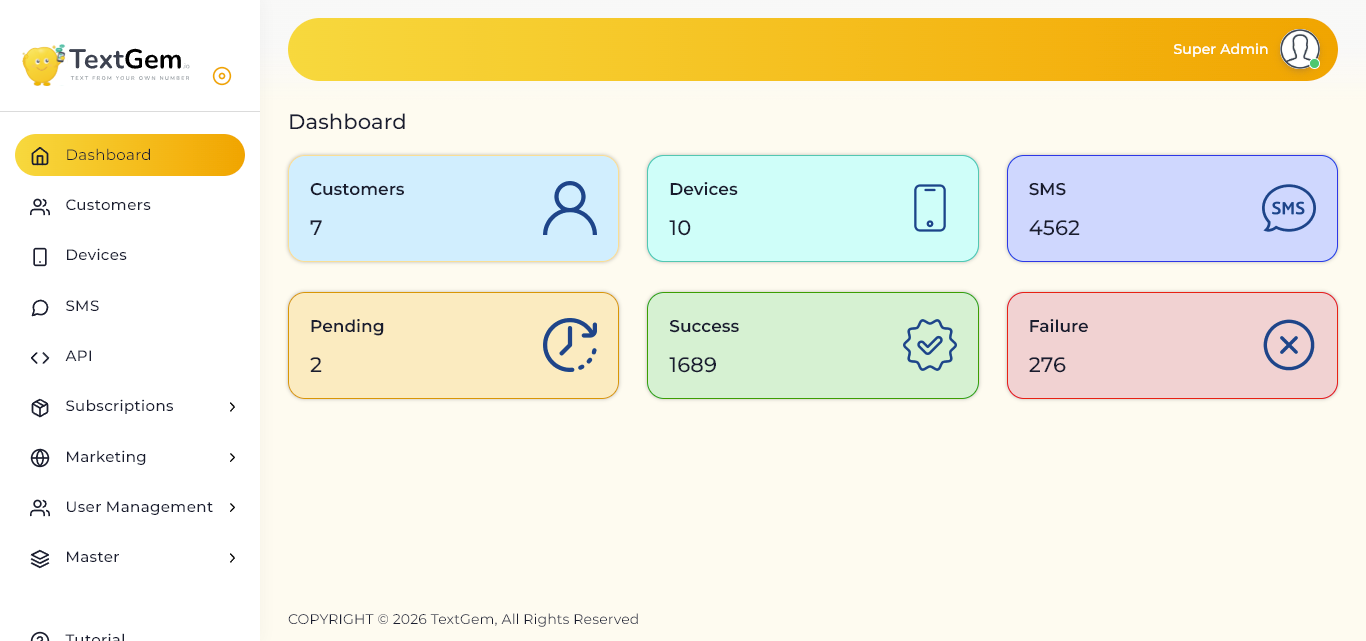
When you log in to TextGem, the Dashboard is the first screen you see. It gives you a real-time snapshot of your account, helping you track platform usage and message performance without navigating to multiple sections.
The dashboard cards automatically update as customers are added, devices are connected, and SMS campaigns are processed.
Dashboard Metrics
Customers
The Customers card displays the total number of customer accounts currently registered within the platform. This helps administrators monitor account growth and overall customer activity.
What you can view:
Devices
The Devices card shows the total number of Android devices currently connected to TextGem. Each connected device can be used to send SMS messages through its own SIM card.
What you can view:
SMS
The SMS card displays the total number of SMS messages processed through the platform. This includes messages sent across all connected devices and customer accounts.
What you can view:
Pending
The Pending card indicates the number of SMS messages that are currently waiting to be processed or delivered.
Common reasons for pending messages:
Success
The Success card displays the total number of messages successfully delivered to recipients.
Benefits:
Failure
The Failure card shows the number of SMS messages that could not be delivered successfully.